📞💬 Voiso's Flow Builder
Redesign of the tool for creating inbound call and digital message flows
The Challenge
Bridging the gap between complex logic and no-code simplicity.
The original Flow Builder (V1.0) quickly became overwhelmed by the need to scale. While it handled basic voice IVR, the project evolved into an Omnichannel solution, introducing significant complexity that the existing UI could not support.
Our design challenge for Version 1.2 was to deliver a massive expansion of features—from supporting Telegram/WhatsApp attachments and buttons to integrating proprietary AI bots and advanced HTTP logic—all without sacrificing ease of use.
The problems we had to solve were threefold:
Our design challenge for Version 1.2 was to deliver a massive expansion of features—from supporting Telegram/WhatsApp attachments and buttons to integrating proprietary AI bots and advanced HTTP logic—all without sacrificing ease of use.
The problems we had to solve were threefold:
- Complexity Overload: Integrating new digital channel features and powerful back-end systems (AI, TTS, complex HTTP requests) threatened to render the tool unusable. The design had to abstract this immense technical depth into simple, functional, and performant visual nodes.
- Lack of Scalability: The interface needed to be re-engineered for expansion, capable of hosting future features while allowing administrators to easily navigate and manage both small and massively complex omnichannel flows.
- Preventing Business Errors: Users struggled to visualize the full complexity of their logic, resulting in high rates of abandoned calls and dropped chats. The UI needed to provide immediate clarity to prevent costly configuration errors in mission-critical customer journeys.
Our goal was to build a truly intuitive, scalable environment for omnichannel communication automation.
Research & Analysis
From Pain Points to Project Nodes: Mapping User Needs
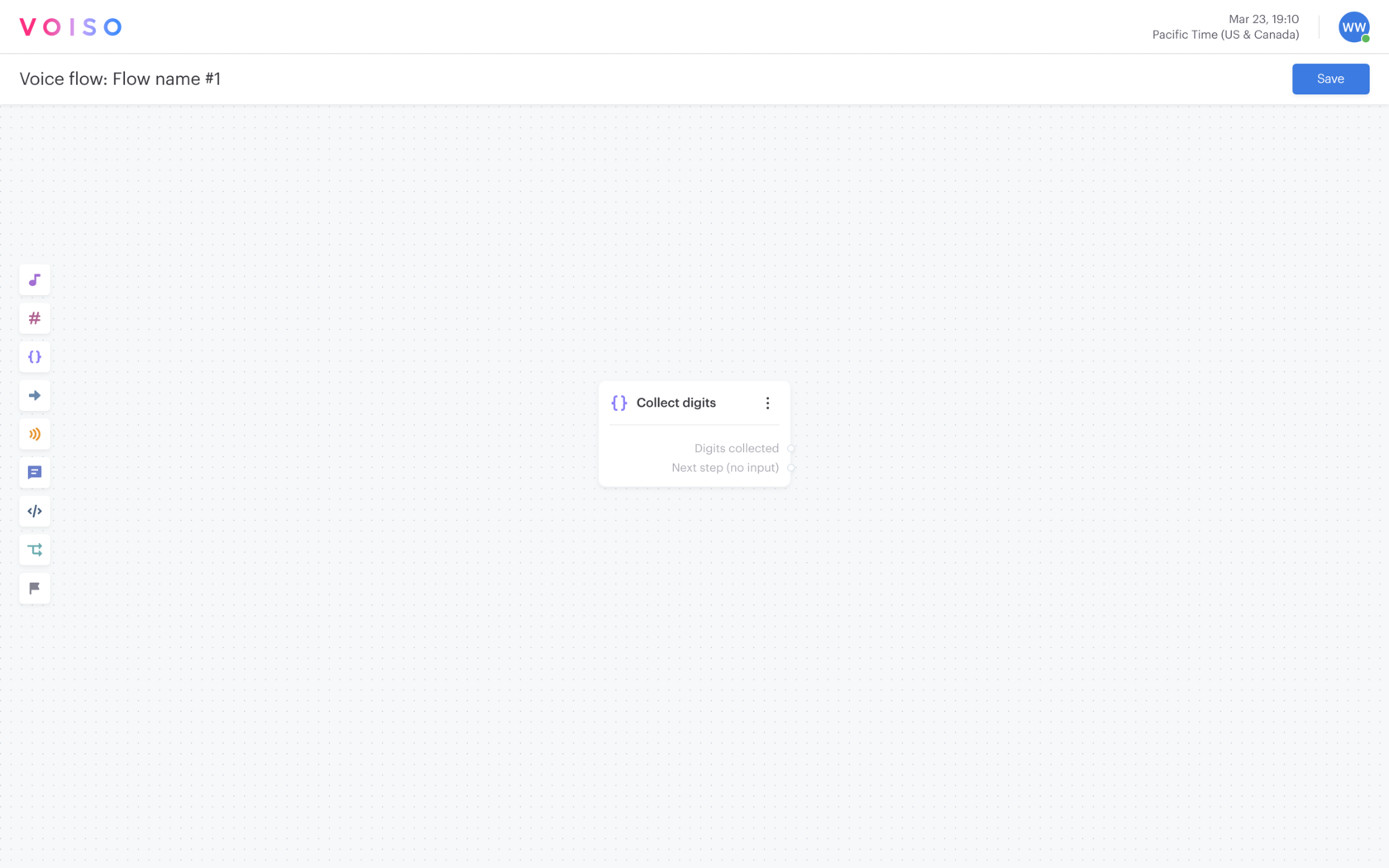
As of April 2024, the tool consisted of functionality that was, in places, poorly integrated, lacked advanced digital capabilities, and suffered from a limited node set. After gathering user feedback and confirming the internal team's strong desire to update the tool, we started the work.
My research focused on two key user groups: Call Center Administrators, who are the primary users setting up the flows, and our internal Board Engineers, who possessed deep expertise in initial client configurations. We conducted interviews, internal stakeholder sessions, and hallway usability tests with various concepts.
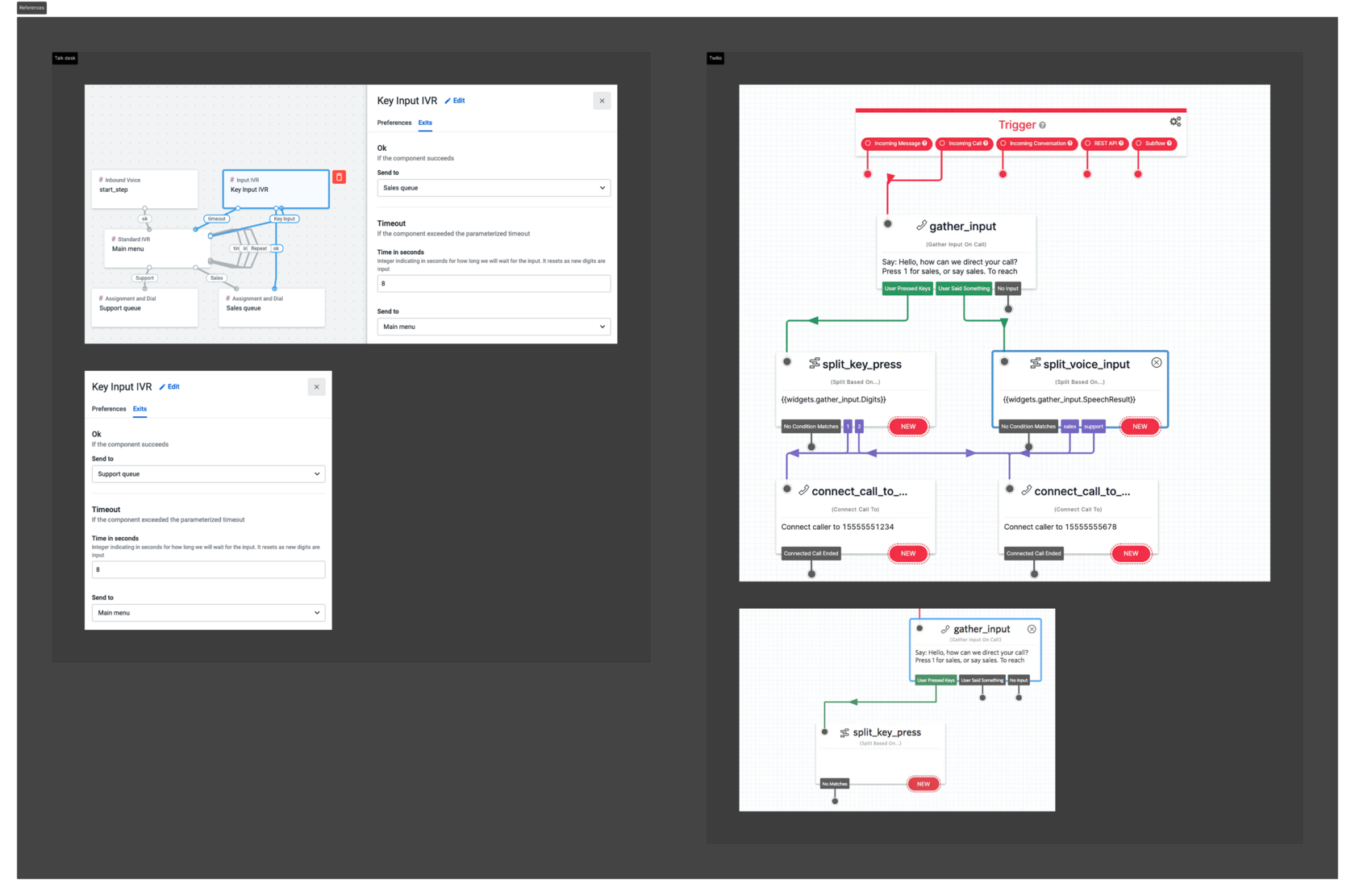
To define the ideal structure for Flow Builder V1.2, we executed a detailed competitive analysis across two main categories:
My research focused on two key user groups: Call Center Administrators, who are the primary users setting up the flows, and our internal Board Engineers, who possessed deep expertise in initial client configurations. We conducted interviews, internal stakeholder sessions, and hallway usability tests with various concepts.
To define the ideal structure for Flow Builder V1.2, we executed a detailed competitive analysis across two main categories:
- Voice Flows: Analyzing best practices from leaders like Twilio, TalkDesk Studio, and AWS to define optimal IVR logic, animations, and structural patterns.
- Digital Flows: Reviewing systems like Manychat and Facebook Business Manager to understand how to handle messenger-specific interactions (buttons, quick replies, attachments) effectively.
Flow Builder V1.1 (Previous version)
References
This analysis informed our most crucial architectural step: Information Atomization. We defined the entire functional ecosystem by classifying all new and existing nodes into three high-level categories (Voice, Digital, and Universal). Crucially, we identified repeated, indivisible functional blocks—such as the Audio Message block (handling TTS/audio file playback)—that appeared in multiple nodes (e.g., Play Audio, Collect Digits, Voicemail).
By isolating these "atoms," we ensured that the new design would be consistent, highly reusable, and structurally robust for future scalability.
By isolating these "atoms," we ensured that the new design would be consistent, highly reusable, and structurally robust for future scalability.
Conceptualizing the Experience
Wireframes to Interaction
Following the structural analysis, the next phase involved translating the complex requirements into a functional and aesthetic visual interface. Our goal was to create interaction patterns that were familiar yet powerful enough to handle the new omnichannel complexity.
1. Maintaining Context and Flow Direction
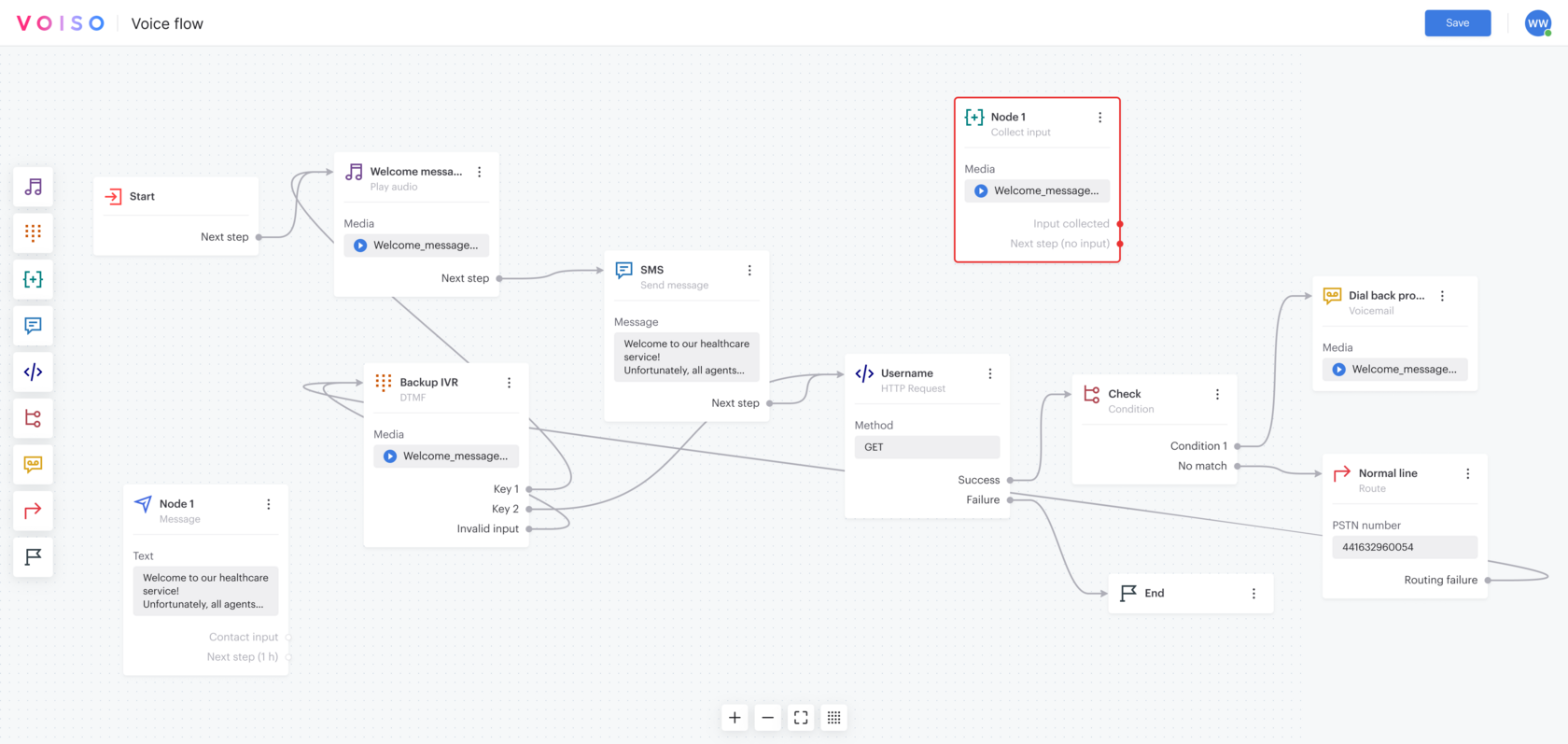
We chose to retain the horizontal flow direction, aligning with the previous V1.0/V1.1 versions and established patterns found in leading digital workflow and marketing tools. This continuity minimized the learning curve for existing users and felt intuitive for new digital-focused users.
We chose to retain the horizontal flow direction, aligning with the previous V1.0/V1.1 versions and established patterns found in leading digital workflow and marketing tools. This continuity minimized the learning curve for existing users and felt intuitive for new digital-focused users.

2. Mastering Scale without a Minimap
While we did not implement a minimap, we addressed the challenge of large, complex flows through several key navigational improvements:
While we did not implement a minimap, we addressed the challenge of large, complex flows through several key navigational improvements:
- Zoom to Fit: Introducing a Zoom to fit function provided users with an instant global view of the entire flow, regardless of its size.
- Custom Naming: Allowing users to assign custom names to each node significantly improved overall flow readability and navigation, making it easier to search and identify specific steps.
- Performance & Fidelity: We improved the canvas's movement patterns, ensuring a smoother, more tactile experience during panning and zooming.
3. Dynamic and Contextual Configuration
We engineered the configuration process to avoid visual clutter and maintain focus on the main canvas:
We engineered the configuration process to avoid visual clutter and maintain focus on the main canvas:
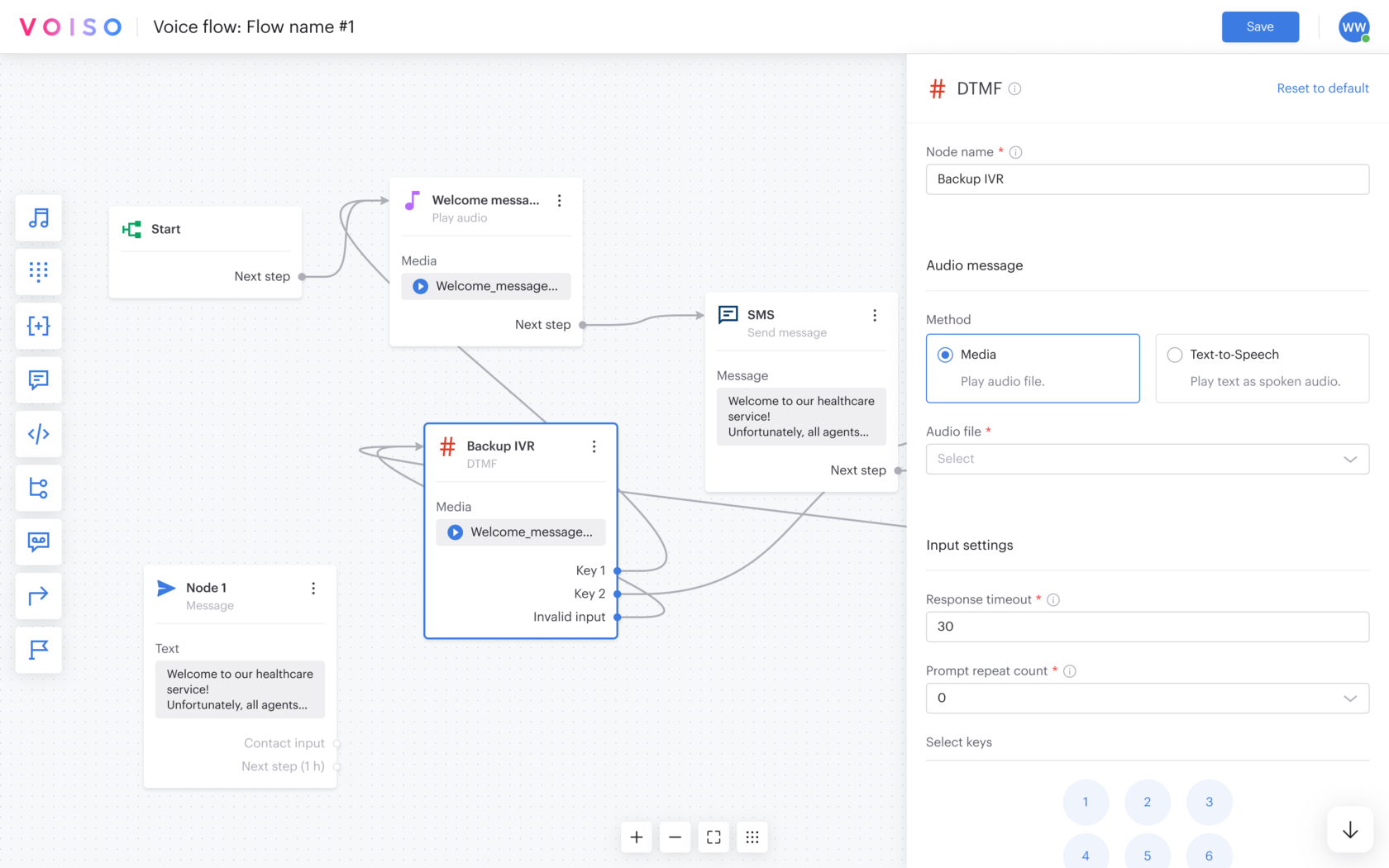
- Right-Panel Configuration: Clicking any node opened a dedicated Configuration Panel on the right side of the screen. This dynamic panel displayed only the relevant settings for the selected node, promoting focused editing.
- Layered Complexity: For extremely complex settings, we utilized local overlays or state toggles within the panel, preventing the main screen from becoming overloaded.
- Visual Consistency: We ensured that the visual coding—icons and colors—was consistent across three states: the Node Palette, the Node itself on the canvas, and the Configuration Panel.
4. Safety and Error Prevention
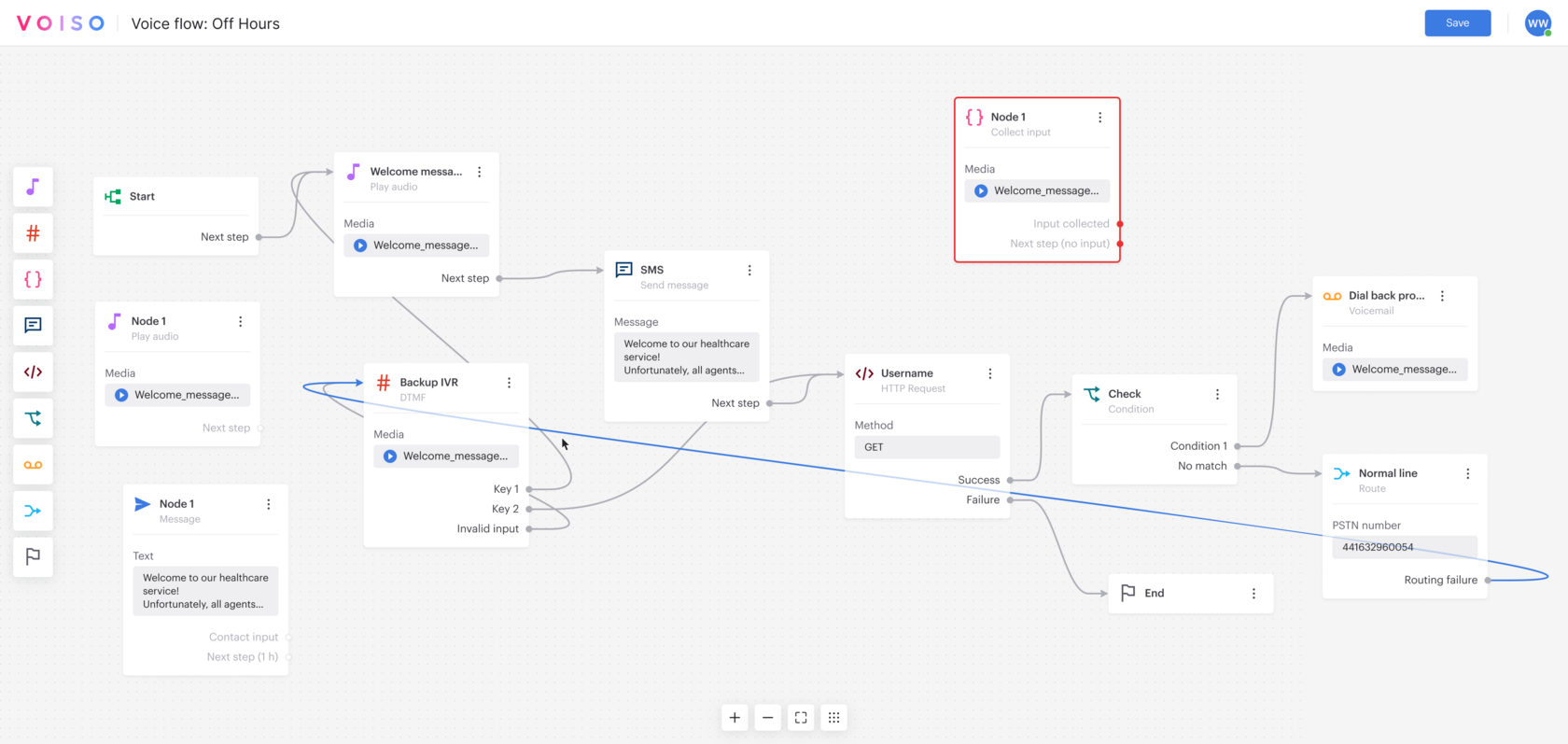
A critical step was ensuring flow integrity. To prevent illogical connections, we established a hard separation: Voice and Digital nodes cannot be mixed within a single flow. The user must first choose the channel (Voice or specific Messenger) upon creation. We then guided the connection process with micro-animations, clear state changes, and subtle color coding to make the linking of nodes intuitive and reduce the risk of structural errors.
A critical step was ensuring flow integrity. To prevent illogical connections, we established a hard separation: Voice and Digital nodes cannot be mixed within a single flow. The user must first choose the channel (Voice or specific Messenger) upon creation. We then guided the connection process with micro-animations, clear state changes, and subtle color coding to make the linking of nodes intuitive and reduce the risk of structural errors.
Key Design Solutions
Innovation in Visual Automation
The design solutions in Flow Builder V1.2 directly addressed the challenge of scaling complexity, ensuring the interface remained clean, intuitive, and efficient for administrators managing mission-critical communication flows.
Solution 1: Contextual Configuration for Omnichannel Depth
The greatest complexity lay in the new Digital Message Node, which handles nuanced features like attachments, quick replies, and buttons across various channels (WhatsApp, Telegram).
The greatest complexity lay in the new Digital Message Node, which handles nuanced features like attachments, quick replies, and buttons across various channels (WhatsApp, Telegram).
- Design Innovation: We employed a Contextual Configuration approach. The right-hand panel dynamically displayed only the settings actively added or required by the user. By hiding unused options, we transformed a potentially overwhelming list of over a dozen channel-specific settings into a clean, focused workflow. This ensured users could leverage powerful features without unnecessary cognitive load.
Solution 2: Structural Clarity and Path Visualization
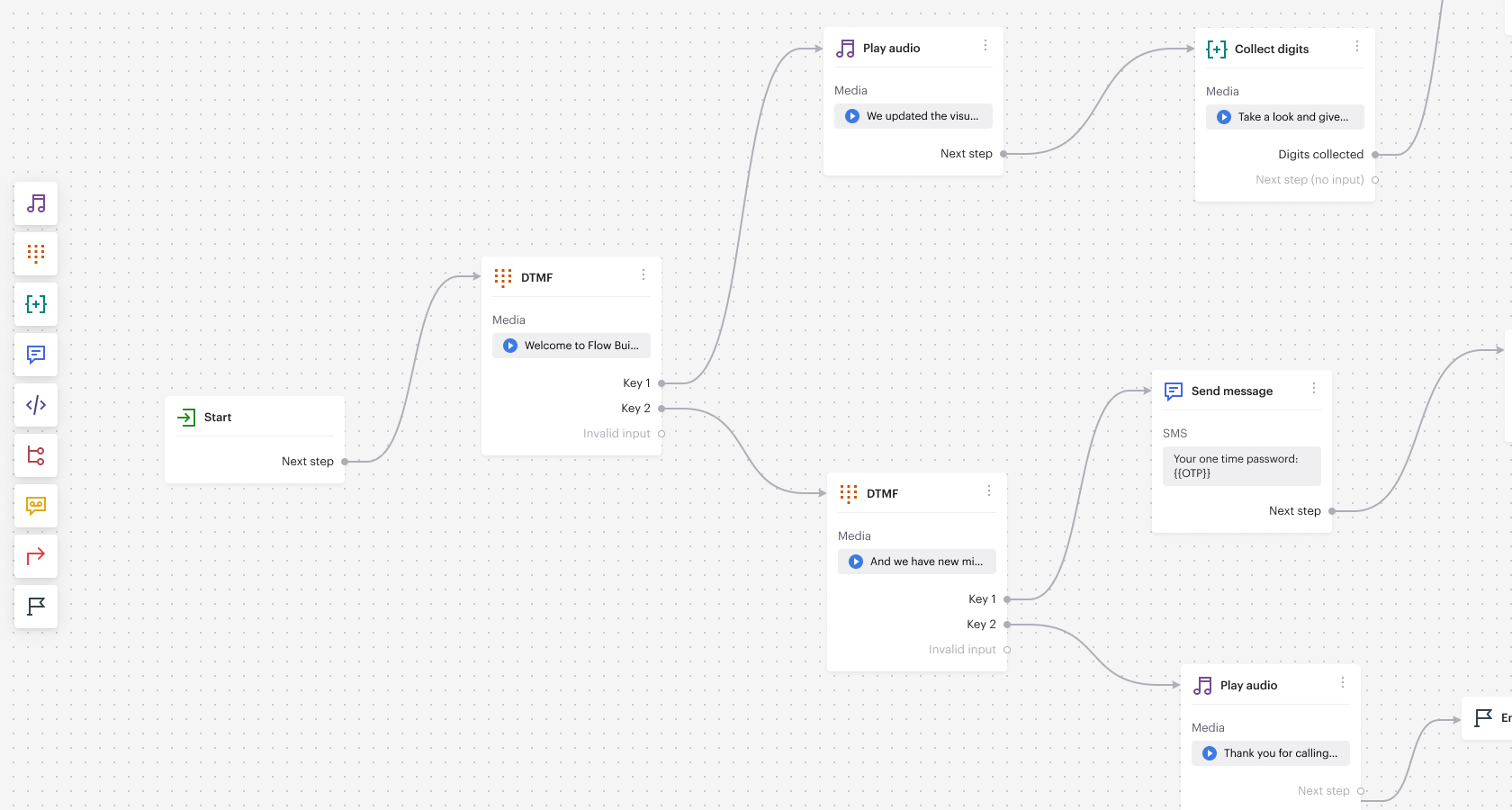
With the introduction of new Voice (Collect Digits, redesigned Play Audio) and Digital-specific nodes (Message), maintaining visual clarity was paramount.
With the introduction of new Voice (Collect Digits, redesigned Play Audio) and Digital-specific nodes (Message), maintaining visual clarity was paramount.
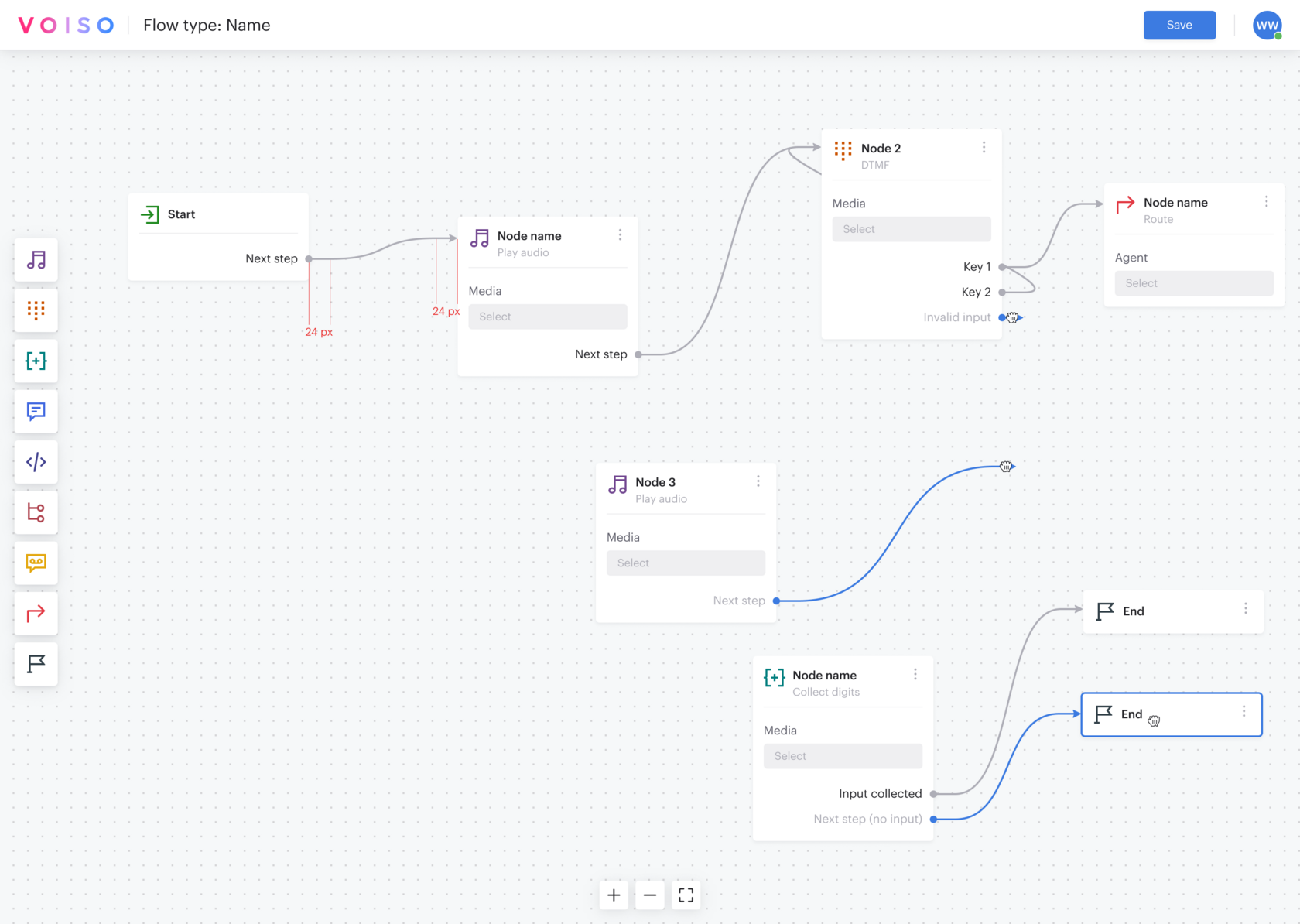
- Design Innovation: We established a strict, clear information architecture: Voice and Digital flows are mutually exclusive, preventing illogical connections from the outset. Crucially, we implemented Connector Highlighting. A user can instantly select a connector line to visualize the exact path it represents, which is vital for debugging complex branching logic (e.g., in Condition or DTMF nodes) and ensuring seamless customer journeys.
Solution 3: Atomic Consistency and Reusable Modules
To ensure rapid, consistent development and a predictable user experience, we formalized the component structure.
To ensure rapid, consistent development and a predictable user experience, we formalized the component structure.
- Design Innovation: Functionality that repeats across multiple nodes—such as the Audio Message playback setup (used in Play Audio, Collect Digits, and Voicemail nodes)—was designed as a single, reusable Atomic Module. This module possesses identical visual presentation and behavior wherever it appears, drastically reducing the mental overhead for the user and ensuring consistency across the entire 12-node system.
Solution 4: Real-Time Error Prevention
To solve the business problem of abandoned calls due to flawed flow logic, we integrated active validation into the design.
To solve the business problem of abandoned calls due to flawed flow logic, we integrated active validation into the design.
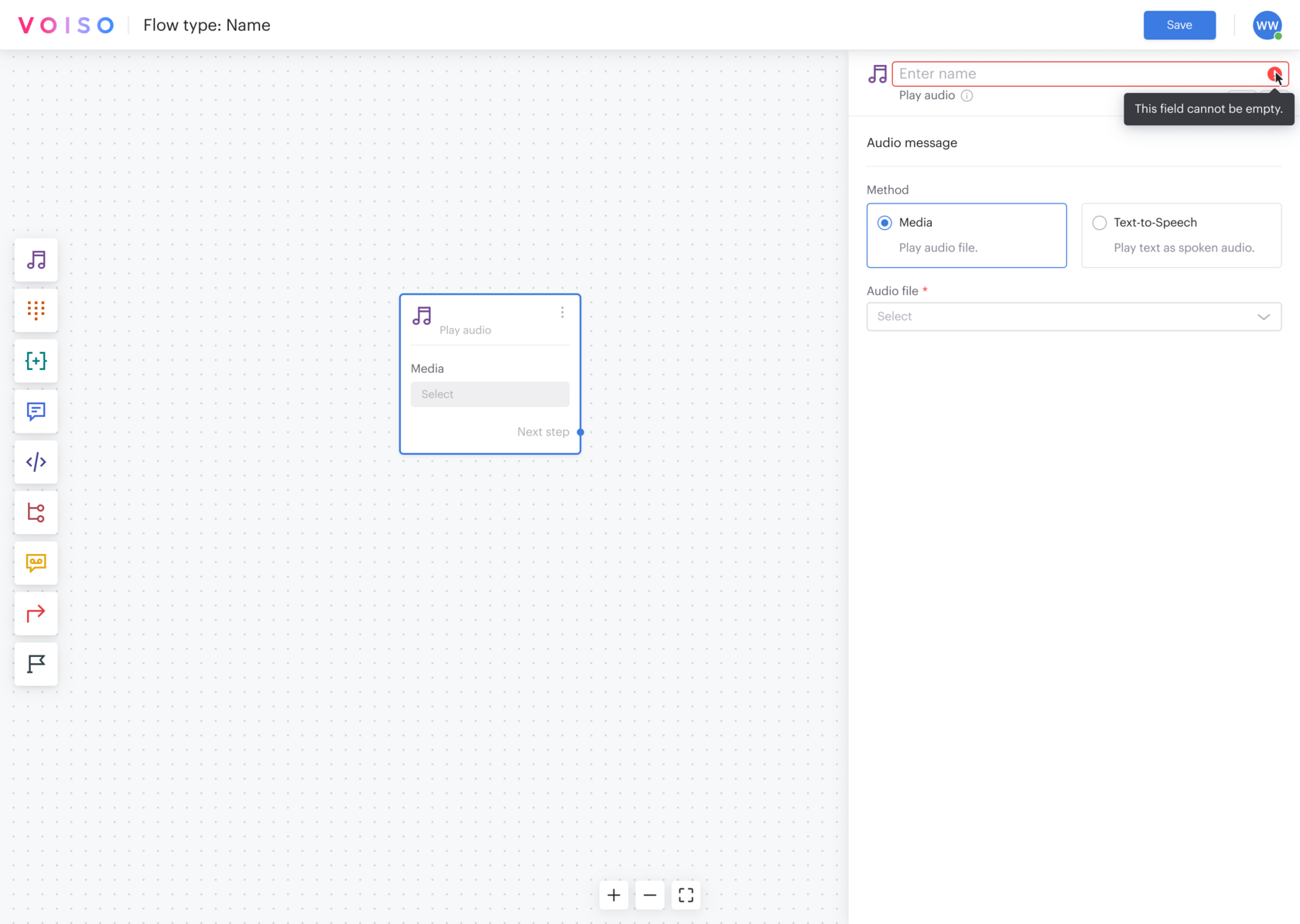
- Design Innovation: The system features real-time visual validation. Nodes that contain configuration errors (missing parameters, invalid data) are immediately highlighted on the canvas. A final, comprehensive validation step is performed before the user can save the flow, effectively guiding administrators to correct critical errors before the flow ever goes live.
Beyond the Core Solutions: Attention to Detail
- While these four points represent the most significant architectural and functional design innovations, the overall success of Flow Builder V1.2 was also dependent on a meticulous focus on polish and interaction design. Dozens of smaller UX improvements, including micro-animations during node connection, refined canvas panning and zooming, and subtle dark theme adjustments, were implemented. These seemingly minor details collectively reduced cognitive load, elevated the perceived quality, and made the complex task of flow building a smoother, more enjoyable experience.
Results & Impact
Strategic Success and User Adoption
As the design process for Flow Builder V1.2 was focused on foundational structural changes and feature expansion, the primary impact is measured through user validation and strategic product advancement, rather than immediate quantitative metrics.
Key Qualitative Outcomes:
"The success of Flow Builder V1.2 confirms that enterprise-level communication tools can be both powerful and elegantly simple. By bridging the gap between sophisticated back-end logic and a clean visual front-end, we successfully delivered a product that is ready for the future of omnichannel communication."
Key Qualitative Outcomes:
- Improved Usability and Adoption: Based on direct feedback from administrators, sales teams, and internal board engineers, the new visual editor was met with strong positive reception. Users consistently reported a significantly easier and more intuitive experience when creating and managing complex flows, validating the decision to prioritize visual clarity and contextual configuration.
- Enhanced Operational Efficiency (Qualitative): While specific percentages for time savings were not tracked, the reduction in visual clutter, the new ability to easily navigate large flows via custom naming, and the integrated error validation collectively resulted in a noticeable decrease in the friction associated with flow configuration. The tool is now genuinely manageable for non-developer administrators.
- Strategic Market Enablement: The redesign was crucial in allowing Voiso to expand its competitive offering. The simplified integration of complex digital features allowed the platform to significantly improve its capability to handle high-demand channels, notably WhatsApp. This design work directly enabled enhanced service delivery and market positioning for omnichannel solutions.
"The success of Flow Builder V1.2 confirms that enterprise-level communication tools can be both powerful and elegantly simple. By bridging the gap between sophisticated back-end logic and a clean visual front-end, we successfully delivered a product that is ready for the future of omnichannel communication."
Reflecting on the Voiso Flow Builder project, we successfully proved that complex, enterprise-level automation does not require a complex interface. The redesign established a scalable foundation, ready to integrate future AI and communication channels. I look forward to continuing to evolve this platform into the industry’s most intuitive visual automation tool.